The eras
Rigforge is three days old and changes daily. Each entry below is one step of the work, grouped into eras. The last era is work that is tested but not part of the tool yet.
A rough trial on one graphics card
One day from a script that turns a concept picture into a rigged model to an editor that feels like an app: a model library, a 3D viewport, joints you can drag, clips from our animation library, and an assistant and Auto-fix that repair a rig and keep only what measurably helps.
Creatures, not just people
Most of Second Spring's creatures are not shaped like people. A body plan read from the concept now decides the rig: four legs, six legs, wings, fronds and tails get their own skeleton and their own walk, idle and flap. The concept is painted back onto the model so faces stay sharp.

A tool you can leave running
A job queue that survives a restart, one lock on the graphics card, a second image-to-3D model (TRELLIS.2) to compare against the first, access from other devices at home, and smarter checks on when a concept may be painted onto a mesh.

More than one picture
Your own side and back pictures as input, why three pictures first made things worse, a mode where they only steer the rough shape, a fix for pale stripes painted down creatures' backs, and a closer look at which models we can use.
Props and true colours
Rigforge learned to make props without a rig, checks the concept before building in 3D, and shows models in their real colours.
What we are working on
Tested but not built in yet: splitting tricky parts such as crystals off before the mesh is made, rig fixers that can see motion and move joints, and running the heavy steps on graphics cards in the cloud instead of our own machine.
A rough trial on one graphics card
One day from a script that turns a concept picture into a rigged model to an editor that feels like an app: a model library, a 3D viewport, joints you can drag, clips from our animation library, and an assistant and Auto-fix that repair a rig and keep only what measurably helps.
- 1 3 Nov
Concept picture to rigged model on one 16 GB graphics card
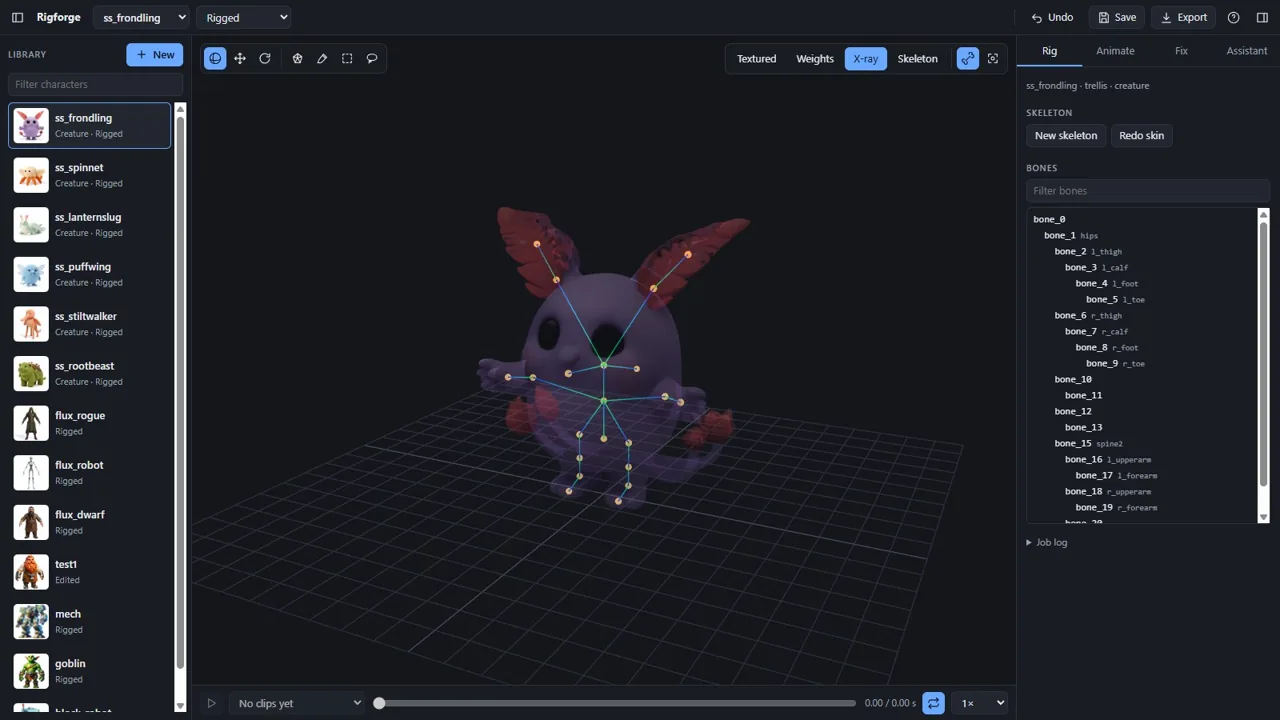
doneRigforge started as a rough trial of a simple question: can our own machine do what the image-to-3D services do? A concept picture goes in. TRELLIS turns it into a textured 3D mesh, a clean-up step removes loose debris, scales the model to size and stands it on the ground, and UniRig builds a skeleton and skin weights. Out comes a rigged GLB.
It all has to fit on one laptop graphics card with 16 GB of memory. The trick is not a smaller model: every step runs as its own process, so only one model is on the card at a time, and its memory is fully freed before the next one loads. TRELLIS peaks at about 10 to 11 GB, UniRig needs about 8. Most of the first day went into getting both to install and run reliably.
70eeb75, 08ef84f, f698316, de966cc, 09722d6, 26cd2ce, 8802da0, 2a2a0a0The frondling's skeleton in X-ray, with the bone list. From the repo · 3 Nov - 2 3 Nov
Start from a sentence
doneA job can now start from text instead of a picture. FLUX.2 klein draws the concept first, and Rigforge wraps the prompt with what image-to-3D and rigging need: the full body, seen from the front, in an A-pose, on a plain background. Arms that touch the body are the most common reason an auto-rig welds them together, so the wrapping asks for space between them.
a3e0cec, 32228d6 - 3 3 Nov
From scripts to an editor that feels like an app
doneThe scripts became a browser app: a library of models on the left, a 3D viewport in the middle, and tabs for the rig, animation, fixes and the assistant. Drag a joint and the skin is re-bound live, so the mesh stays put and only the joint moves. Rotate bones in a test pose to see how the weights bend, switch between textured, weights, X-ray and skeleton views, and scrub through clips on a timeline.
Clips come from our animation library and are retargeted onto the rig: each bone's rotation is carried over from the clip's rest pose to the rig's, so an A-pose model follows T-pose clips. For capes, robes and rigid armour there are selection tools (click, brush, box, lasso) and fixes: make a part rigid, smooth or move weights, or add chains of spring bones that swing while a clip plays. The clean-up step also stopped deleting small UV islands as if they were debris.
0b2e2c2, d7377e3, 1e72109, 04a5228Rigforge: the model library, the 3D viewport and the tabs for rig, animation, fixes and the assistant. From the repo · 3 Nov The stiltwalker's skin weights, one colour per bone. From the repo · 3 Nov A walk from the clip library, mid-stride, with the timeline below. From the repo · 3 Nov - 4 3 Nov
An assistant that plans the fix
doneDescribe the problem in words, for example “the chest plate bends like rubber when he moves”. An AI model gets the bones, the parts it has found, the current selection and pictures of the model from the front, side and back, and answers with a plan made of the same tools the Fix tab offers. Nothing changes until you press Apply, and one Undo takes back the whole plan.
d7377e3, aa70fe0The assistant finds the chest plate and plans the fix: select the torso, then make it rigid on the chest bone. From the repo · 3 Nov - 5 3 Nov
Auto-fix: stress test the rig, keep only what helps
doneAuto-fix inspects a rig without being asked. It finds the parts, plays a walk, a sprint, a punch and a jump, and measures each part on the processor: where the mesh tears, stretches, warps (a rigid piece that changes shape) or where the body pokes through cloth. The AI gets those numbers and pictures and proposes separate fixes.
Each fix is applied and measured in turn. It stays only if the stress on the parts it targeted falls by at least 15% and the tearing over the whole rig rises by no more than 10%. The list shows both numbers for every fix, with a switch to turn it off, and one Undo takes back the whole run. It also runs without the editor, from the command line, and never overwrites the original rig.
93468d0, 13c7f43, ea1d81fAuto-fix on a boxy robot: three fixes, each with the stress it removed and the tearing over the whole rig before and after. From the repo · 3 Nov
Creatures, not just people
Most of Second Spring's creatures are not shaped like people. A body plan read from the concept now decides the rig: four legs, six legs, wings, fronds and tails get their own skeleton and their own walk, idle and flap. The concept is painted back onto the model so faces stay sharp.
- 6 3 Nov
A body plan, and a rig for every shape
doneThe skeleton UniRig makes works on any mesh, but most of Second Spring's creatures have four or six legs, wings, fronds or a slug's body. Rigforge now first asks the AI to read the concept and numbered renders of everything that sticks out of the mesh. The answer is a body plan: which bump is a leg, a wing, an ear or a tail, and which way the model faces.
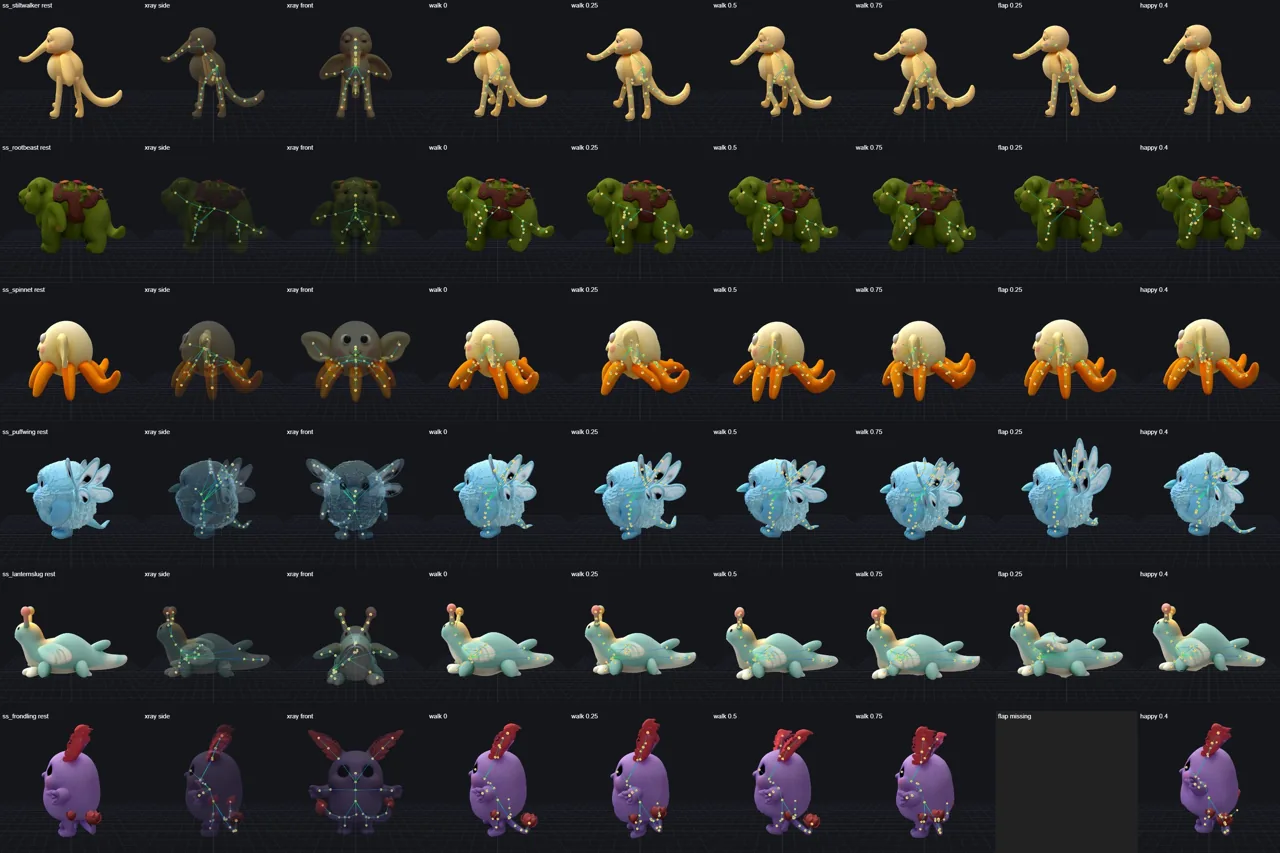
Humanoids still go to UniRig. Anything else gets a skeleton built from the plan: a spine, then a chain down the middle of each limb. Its skin is made two ways, by distance through the solid and by Blender's automatic weights, and a stress test keeps whichever does better. Its clips are written for its number of legs: idle, walk, happy, hit, sleep and look, plus flap when both the plan and the concept show real wings. Ears, flaps, fins and fronds move softly instead. A limb the plan missed can be selected and added by hand.
93a4e84, 8932f68Creature rigs and their own walk cycles, frame by frame. From the repo · 3 Nov - 7 3 Nov
Painting the concept back on
doneTRELLIS blurs small details such as eyes, and its colours drift from the concept, most of all on the back. So after the mesh is made, Rigforge paints the pictures back onto the texture at a higher resolution. It solves each picture's camera by fitting the mesh's outline and colours, nudges the picture's features onto the mesh's, and blends it in by how squarely each bit of surface faces that camera. A view whose outline fits less than 80% is skipped, because its features would land in the wrong places.
8932f68Before and after painting, on a dwarf, the frondling and the puffwing: the face, the body, three-quarter and back. From the repo · 3 Nov Creatures with the concept painted back on. From the repo · 3 Nov - 8 3 Nov
Six Second Spring creatures, start to finish
doneThe first real test: the rootbeast, stiltwalker, puffwing, lanternslug, spinnet and frondling, each from a prompt to a painted, rigged and animated model in about three minutes. It found a real fault on the way: the puffwing's wing weights dragged its head along with every beat. That was fixed, and Auto-fix learned to check what each clip should leave alone (the head and body during a flap, the feet during idle and look) and hand stray weight back to the nearest bone that holds still.
c8c0425, 4a8506cRootbeast, stiltwalker and puffwing: from concept to mesh, rig and pose. From the repo · 3 Nov Lanternslug, spinnet and frondling: from concept to mesh, rig and pose. From the repo · 3 Nov The puffwing's flap. Before: the head squashes as the wings beat. After: the head holds still. From the repo · 3 Nov The six creatures with painted textures and rebuilt rigs. From the repo · 3 Nov
A tool you can leave running
A job queue that survives a restart, one lock on the graphics card, a second image-to-3D model (TRELLIS.2) to compare against the first, access from other devices at home, and smarter checks on when a concept may be painted onto a mesh.
- 9 4 Nov
A queue, one lock on the graphics card, and access from the couch
doneJobs now wait in a queue and run one at a time, in the order they were added. The queue survives a restart: a job that was halfway through a step starts that step again. It shows rough times from earlier jobs, with Cancel and Move to top, and jobs started from the command line join the same line.
Every step that uses the graphics card takes one lock first, then waits until other programs leave it enough memory, and says so (“9.1 GB is in use by other apps”). Painting, clean-up and the creature rigs run on the processor, so they don't wait. On Windows the server starts and stops with a double-click, and other devices on the home network can open the editor. Creatures also stopped getting wings by default.
466c036, e91bdc7, 343f48c, 6f0a936 - 10 4 Nov
TRELLIS against TRELLIS.2
doneTRELLIS.2, the larger successor, joined as a second image-to-3D model. It officially wants 24 GB; on our 16 GB card it runs in a low-memory mode at full detail for most pictures, and a picture that runs out of memory starts again at half the resolution by itself. One button makes a twin job from the same concept, so the two can be compared side by side.
On the frondling TRELLIS.2 was clearly better: crisp fronds where TRELLIS's were blotchy, and one clean flower on each tail where TRELLIS doubled one. On the furry puffwing neither did well, and TRELLIS.2's body came out rougher. It also takes about three times as long (250 against 89 seconds for the frondling's mesh) and makes files twice the size. We keep both.
e91bdc7, a7760bd, 11730fa, 9ddeba0, 4f8846dFrondling: the concept, TRELLIS and TRELLIS.2, same camera and light, painted and before rigging. From the repo · 4 Nov Puffwing: the concept, TRELLIS and TRELLIS.2. Neither model handles this much fur. From the repo · 4 Nov - 11 4 Nov
Smarter about when to paint, and turning a face to the front
donePainting the concept on goes wrong when the camera fit is poor, so the checks got finer: the front is skipped when a weak outline fit and a weak colour match agree, and painted anyway when the outline is poor but the colours match well. Standard quality paints only the front. A concept drawn at three-quarter view can now be turned so its face points to the front before rigging.
451423b, e9c4fdb, 09243a2, 74b141e
More than one picture
Your own side and back pictures as input, why three pictures first made things worse, a mode where they only steer the rough shape, a fix for pale stripes painted down creatures' backs, and a closer look at which models we can use.
- 12 5 Nov
Your own side and back pictures
doneA model no longer has to come from the front alone. The New dialog takes your own side and back pictures as well; their backgrounds are cut out first, and FLUX draws whichever view you leave out, with the front as its reference. The extra views paint the texture where the front can't see.
The first test on the frondling taught us something. With all three pictures shaping the mesh, its doubled tail flower was gone, but its fronds turned into thick flat slabs. TRELLIS has no real multi-view model: with three pictures it takes turns, so the front steers only a third of the steps and its fine detail gets watered down. So by default the front alone shapes the mesh, and the other views only paint it.
629b312, 6107c07, 862b27a, ae07ca1The frondling's three pictures: the front, and a side and back drawn from it. From the repo · 5 Nov The mesh from the front picture alone (top) and from all three (bottom): tails fixed, fronds flattened. From the repo · 5 Nov - 13 5 Nov
Side and back steer only the rough shape
doneA middle way: the side and back only steer the first, rough-shape stage of TRELLIS, and the front gets two turns there for each of theirs. The detail stage uses the front alone; letting the other views in there gave the frondling ghost eyes and hands. That kept the thin fronds and the tail fix in the same 85 seconds.
It held up on the frondling at two seeds, but the furry puffwing's body and tail came out worse, so it is an option (“High, multi-view rough shape”) for creatures with thin parts, not the default.
b197dff, 8889bf3, 6be845dSix ways of using the frondling's extra pictures. Row 3, rough shape only with two turns for the front, kept both the fronds and the tail fix. From the repo · 5 Nov The same mode on a second frondling seed and on the puffwing: better on the first, worse on the second. From the repo · 5 Nov - 14 5 Nov
No more stripes down the back
donePale stripes down some creatures' backs came from side views painting the wrong colours onto thin meshes, and a crooked camera fit could do the same. A side or back view now has to match the mesh's colours, and come out straight, before it paints. Repainting the whole catalogue changed only three creatures: the steamhorn and the tortlebough got cleaner, the burrbun's sides a little paler. The new frondling rigs and walks without tearing.
241d39a, 9c0a755, c6d2a91The three repainted catalogue creatures, before and after, and the new frondling rigged. From the repo · 5 Nov - 15 5 Nov
Which models we can use
doneWe compared two FLUX models for drawing the side and back views, with and without chaining one view into the next. There was no clear winner: one kept the fronds and fur closer to the front, the other gave cleaner bodies but turned the frondling's back fronds into furry ears. Better pictures don't fix TRELLIS's turn-taking anyway, so nothing changed.
We also removed one image-to-3D model completely. Its licence does not apply in the European Union and forbids using the model or what it makes there, so from the Netherlands we can't use it at all, not even for a test. A smaller FLUX model that runs on our own card is on its way: it draws a picture in about 16 seconds, once we noticed it was taking 50 steps where it was made for 4.
76b242c, 8290c76Side and back views from two FLUX models, from the front alone or chained from the front and side. From the repo · 5 Nov - 16 5 Nov
Splitting off the tricky parts
doneTRELLIS struggles with thin, see-through or spiky parts. The chimeling, a lilac creature with a backpack of clear crystals, came out with its crystals fused into a grey fan on its back. Two test rounds tried a fix: find the risky parts in the concept, take them out, build the body from the clean picture, and add the parts back as geometry made in Blender, with a see-through, glowing material.
Round one erased the crystals from the front picture, and TRELLIS invented a big squirrel tail where they had been. Round two first drew a full turnaround of the concept, read the backpack from all three views, then redrew the three views without the crystals. Built from those, the body came out without an invented tail, and a critic compared renders of the result with the turnaround. The approach was approved and went into Rigforge the same day. A job now finds the parts it can't make, such as glass, pins and jewellery, draws the creature without them, builds the body from the clean views and builds the parts in Blender, then checks them against the concept; the parts ride on the rig as rigid pieces. An optional pause lets you untick parts that should stay in the body. Parts are now placed by measuring the body from a cut-out, and the mirrored back view no longer puts them on the centre line.
73913f9, cfbf455, e8f828f, a912e02, 349b280, 637465aRound one: the concept, the masks for the risky parts, and the erased picture. From the repo · 5 Nov Round two: the turnaround, and the same three views redrawn without the crystals. From the repo · 5 Nov Round one's best, round two before the critic, and round two after it. From the repo · 5 Nov - 17 5 Nov
A live steps panel and Reshape the model
doneThe job view now shows each step live as it runs, with its pictures and what the AI model saw and decided, and it follows the newest step instead of jumping to the top. A Steps button in the editor goes back to how a character was made. In the Fix tab, Reshape the model lets you select a region, describe the change, review the plan and apply it, with a new rig and Undo.
73913f9, b5d097c, 89250b9, f652ca8
Props and true colours
Rigforge learned to make props without a rig, checks the concept before building in 3D, and shows models in their real colours.
- 18 6 Nov
Models in their real colours
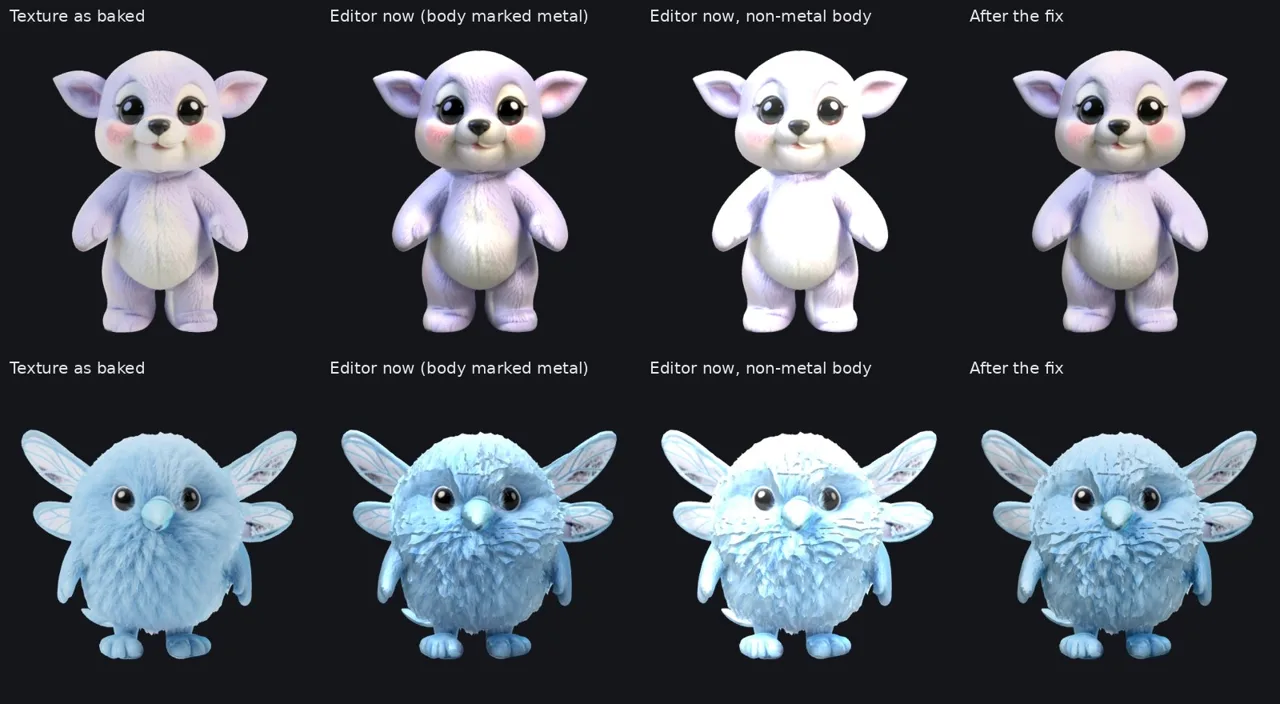
donePale creatures such as the chimeling and the puffwing looked washed out, almost white, in the editor. The bake was fine: the editor's lights added up to about twice the texture's brightness, and TRELLIS leaves out a material setting, so some bodies were read as metal. The editor now lights a model at its own texture brightness, and the cleanup step marks every body as not metal. Existing models were fixed in place.
0c6c84a, 540fb21Left to right: the texture as baked, the editor before, the editor with the body not metal, and after the fix. From the repo · 6 Nov - 19 6 Nov
Props, and a concept check before 3D
doneA new prop mode makes static things, such as buildings and scenery, with no rig and at their real size. Painting a prop keeps the texture's own colours and paints only the sides that face the camera. Before a job spends time on 3D, it now checks the concept picture first, and the progress view shows what each step made. Painting creatures also keeps clear of overlaps, such as hair hanging over an arm.
44cb0ad, 4ffa0c8, e0d4734, 38cecf7, cc7282a - 20 7 Nov
A model picker, and a shared big card
doneEach image-to-3D model is now one entry in a registry, the editor has a model picker, and the right graphics card is chosen by itself. A third image-to-3D model joined TRELLIS and TRELLIS.2, and more are being tried for shapes only. The large cloud card is now shared: up to three jobs run at once and the models stay loaded between jobs, and a run that fails while loaded retries once by itself.
f7a4d5c, e7b49fb, 91b43a1, d0f7e88
What we are working on
Tested but not built in yet: splitting tricky parts such as crystals off before the mesh is made, rig fixers that can see motion and move joints, and running the heavy steps on graphics cards in the cloud instead of our own machine.
- Next 5 Nov
Rig fixers that can see motion
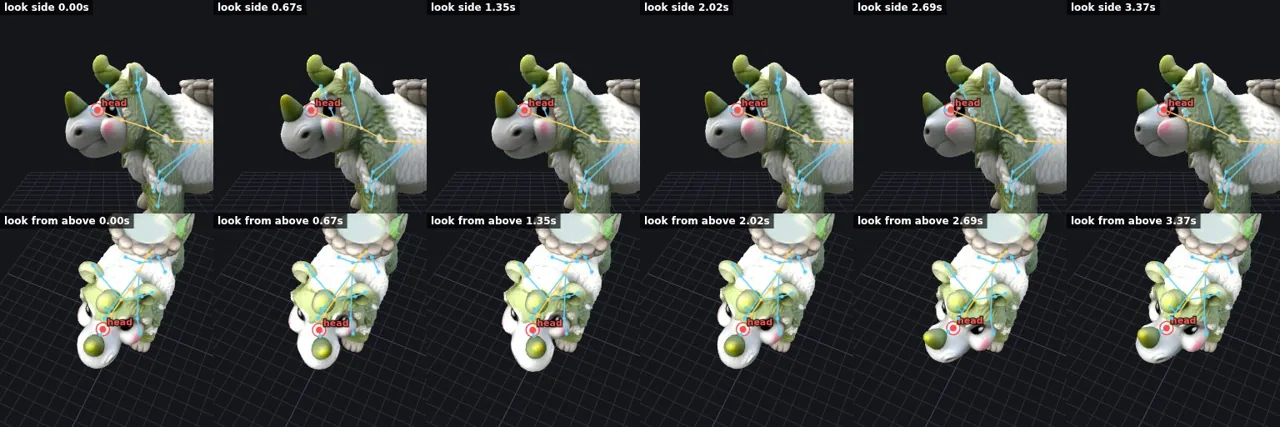
in progressThe steamhorn's look animation turned around a point halfway through its face: the nose swung while the skull stayed put. Neither Auto-fix nor the assistant could fix it, because the head joint sat inside the snout and they only ever saw still pictures and could only change weights.
The fixers now get the same evaluation pack every time, whatever the camera in the editor: an orbit around the model with labelled bones, plus frames from the look, walk and idle clips from fixed angles. Automatic checks measure where the head pivots and whether ears and horns follow. New tools can move a joint, give a bone a new parent and re-weight across a plane, and the fixer checks its own work and retries. Auto-fix took the steamhorn from three failing checks to none in one round. Next is building the head joint right in the first place.
The look clip before: the red ring marks the head joint, inside the snout. From the repo · 5 Nov Before and after: the head now turns at the neck, with the eyes, ears and horns. From the repo · 5 Nov The evaluation pack's orbit, with the bones labelled. From the repo · 5 Nov - Next 5 Nov
Graphics cards in the cloud
in progressRigforge runs on our own laptop's graphics card, and that has become the bottleneck: while a model is made, rendered or baked, the rest of the work on that machine waits. The next step moves the heavy work to graphics cards in the cloud, in the EU. Each job picks its card: a 16 GB one by default, or a much larger and faster one for TRELLIS.2 and batches. The editor shows the expected time and wait for each before you queue. A card that sits idle is switched off, and if the cloud takes one back mid-job, the job saves what it has and picks up again from the step it was in. On 6 November the workers started running as cloud jobs. TRELLIS.2 turned out not to run on the smaller card at all, so the editor now offers the larger one for it and won't queue it on the smaller one.
- Next Later
Straight into Second Spring
plannedSo far Second Spring's creatures still need a few touches after Rigforge: they come out about four times too big, and their materials need a setting so the game doesn't make them look like plastic. Once those are part of the export, a creature goes from a concept to the valley without a hand step in between.
The images are screenshots and test renders from Rigforge’s repository, shown as they were made. The creatures are from Second Spring.